General


2024

It has been a year full of decisions—some very difficult, others quite simple.

I continue to learn what it means to be a father, and it’s proving to be as complicated as I had imagined.

I’m not active on social media, and after the collapse of Twitter, I’ve been trying to revive my activity here on the blog.

On the professional front, I made the decision to leave Netcentric, where I worked for the past five years. I had a great time there, and it was a tough decision, but an exciting new opportunity came my way. I left the AEM consultancy world to join Alén Space, a company focused on building satellites. I now work on their Mission Control System software. So, while I’m still pursuing my career as a Java developer, I’m also taking on a more managerial role, leading a developer team.

In another change, after seven years of working with a Mac, I’m back on Linux—and I’m very happy about it. I also replaced my old home lab Dell T3500 workhorse with a sleeker Minisforum UM890 Pro, and it’s been amazing. For my home office setup, I’ve also switched back to OpenWRT with a Xiaomi AX3000T (with WiFi 6). I had forgotten how easy it is to configure OpenWRT.

This has also been a great year for my home automation journey. I started the year by moving Home Assistant to a small and efficient Orange Pi 3B. I’m extremely happy with the combination of Home Assistant and ESPHome. Home Assistant has become an essential part of our daily routine, mainly for climate control and air quality monitoring.

On a personal note, we moved from an apartment in the city back to our country house. This means more commuting, but it also means more comfort and a better school for our little one. I was disappointed by Santiago de Compostela—it’s turning into a theme park focused solely on tourism.

Finally, I replaced my 20-year-old diesel car with an electric one. I would have switched sooner if I had known just how great and affordable electric cars are. I chose a Tesla primarily for its price-to-technology ratio. I’m not a fan of the brand or their CEO, but the car has made living in the country much cheaper.

Happy 2025!


ESPHome in a RTL8710BX smart plug

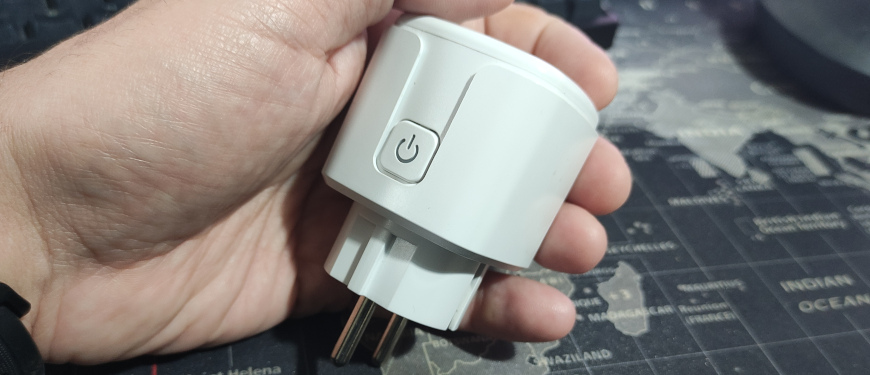
I bought from a popular chinese store a generic Tuya smart plug with power monitoring. It was extrememly cheap, costing less than 4 EUR. And of course I bought it to play trying to flash ESPHome.

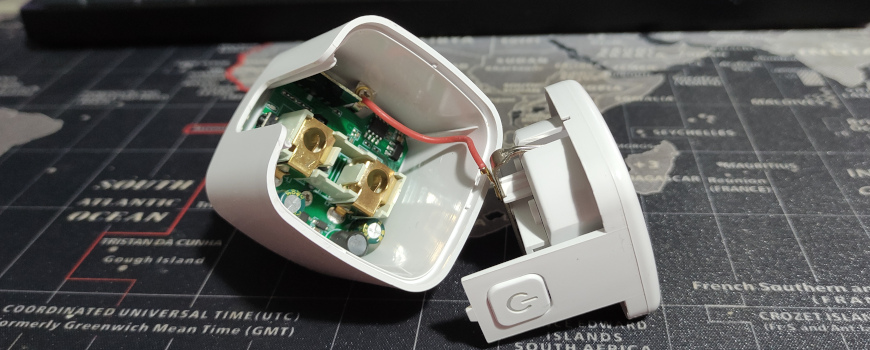
The first challenge was to open it without breaking it. I was able to open it by wrapping it in cardboard and gently tapping it with a hammer around the body.

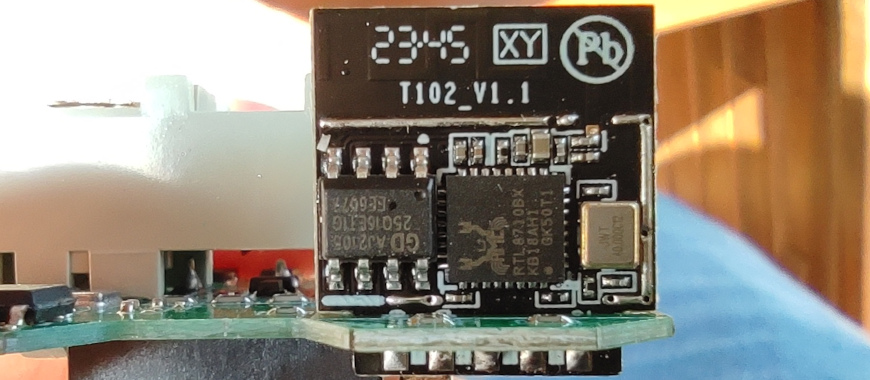
You never know what chip you are going to find. In the past ESP8266 was very common but now they switched mainly to Beken chips. This smart switch has a T102_V1.1 board with a Realtek RTL8710BX chip:

Luckily the support for this chip was developed in the LibreTiny project:

https://github.com/libretiny-eu/libretiny

And now it’s integrated into ESPHome:

https://esphome.io/components/libretiny

This is the board:

https://fcc.report/FCC-ID/2AU7O-T102V11/4540736.pdf

And after investigating the outputs, I reached this conclusion about them:

IndexRTL8710BXConnection
1VDDConnected
3GNDConnected
5GPIO_A18/UART0_RXDConnected to the button
7GPIO_A23/UART0_TXDNot connected
9GPIO_A14/PWM0 Power Monitor SEL pin
11GPIO_A15/PWM1Connected to the relay
2 GPIO_A12/PWM3Power monitor CF1 pin
4GPIO_A0/PWM2Power monitor CF pin
6GPIO_A5/PWM4Status LED inverted (there is another LED connected to the relay)
8GPIO_A30/DEBUG_LOG_TXNot connected, I soldered a cable to the flasher RX
10GPIO_A29/DEBUG_LOG_RXNot connected, I soldered a cable to the flasher TX

ESPHome

I created one device this config in the ESPHome dashboard (without power monitoring, read below if you want to enable it):

substitutions:
  devicename: smartplug1
  friendly_name: Smart Plug 1

esphome:
  name: ${devicename}
  friendly_name: ${friendly_name}

rtl87xx:
  board: wr2
  framework:
    version: 1.5.1

logger:

api:
  password: ""

ota:
  password: ""

wifi:
  ssid: !secret wifi_ssid
  password: !secret wifi_password

  ap:
    ssid: ${friendly_name} Fallback Hotspot
    password: !secret wifi_password

captive_portal:

web_server:
  port: 80

status_led:
  pin:
    number: PA5
    inverted: true

text_sensor:
  - platform: libretiny
    version:
      name: LibreTiny Version

sensor:
  - platform: uptime
    name: Uptime
    filters:
      - lambda: return x / 60.0;
    unit_of_measurement: minutes

  - platform: wifi_signal
    name: Wifi Signal
    update_interval: 60s

binary_sensor:
  - platform: gpio
    device_class: power
    name: Button
    pin:
      number: PA18
      mode: INPUT_PULLUP
      inverted: true
    on_press:
      - switch.toggle: relay

switch:
  - platform: gpio
    id: relay
    name: ${friendly_name}
    pin: PA15
    restore_mode: RESTORE_DEFAULT_OFF

There is currently an open bug in LibreTiny and with the board t102-v1.1 the PA15 output does not work, so I needed to use the board wr2 on line 10.

I built it from the ESPHome dashboard and downloaded a .uf2 file.

Connecting an USB UART to the chip

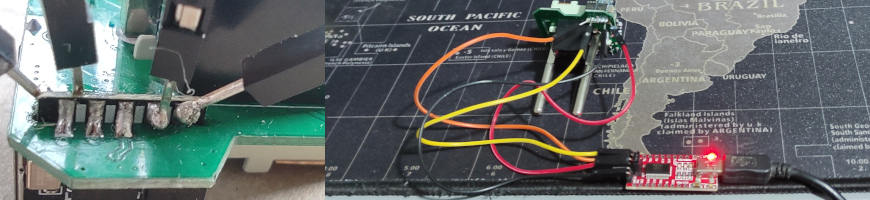
I soldered four dupont cables to VDD, GND, GPIO_A29 and GPIO_A30 connecting them to an FTDI232 USB UART:

While connected to the FTDI232, the log from the chip can be viewed, i.e. with minicom (but remember to disable hardware flow control):

minicom -D /dev/ttyUSB0 -b 115200

Flashing

The official flashing guide does not recomment to power the chip with the USB flasher, but it worked for me:

https://docs.libretiny.eu/docs/platform/realtek-ambz/#flashing

You need the ltchiptool tool, I installed it in a Python virtualenv:

python3 -m venv .
source bin/activate
pip install ltchiptool zeroconf

The ltchiptool GUI caused some segmentation fault, so I used it from the commmand line.

To put the chip in flash mode, we need to power it with the TX pin connected to GND.

In flash mode, I created a backup of the previous firmware:

ltchiptool flash read realtek-ambz flash-backup.bin

And to write the ESPHome firmware:

ltchiptool flash write smartplug1.uf2


After the flashing, if I try to power it from USB the WiFi module did not start and it causes a boot loop, but It worked perfectly plugging it into the mains power. A new device appeared in the router and I can connect to the ESPHome web dashboard.

Adding power metering

The plug includes a power metering chip: the BL0936, that is supported by ESPHome:

https://esphome.io/components/sensor/hlw8012.html

However, after configuring and uploading the firmware with the power meter enabled to the board, the device enters a boot loop, displaying the following error:

[D][switch:016]: 'Smart Plug 1' Turning OFF.
[D][binary_sensor:034]: 'Button': Sending initial state OFF
[C][hlw8012:014]: Setting up HLW8012...
W [      0.109] CHANGE interrupts not supported

Luckily, after 10 reboots, the firmware enters in the “OTA safe mode”, disabling all the modules and connecting to the WiFi without the web dashboard but opening a port to allow remote flashing.

https://esphome.io/components/ota.html

It is a problem in the combination of the RTL8710 chip and the BL0936 module, there is an open issue about this:

https://github.com/libretiny-eu/libretiny/issues/155

It can be fixed with the workaround of SuperXL2023 modifying the .esphome/platformio/platforms/libretiny/cores/realtek-amb/arduino/src/wiring_irq.c file and adding the lines 64 and 65:

62: #if LT_RTL8720C
63:                        event = IRQ_FALL_RISE;
64: #elif LT_RTL8710B
65:                        event = IRQ_RISE;
66: #else
67:                        LT_W("CHANGE interrupts not supported !!!!!!");

In the ESPHome config I’m specifying the version of the framework to avoid losing this fix in an automatic update. It works perfectly after rebuilding the image with this fix and uploading it to the device.

This is the complete ESPHome configuration with power metering:

substitutions:
  devicename: smartplug1
  friendly_name: Smart Plug 1

  voltage_divider: "1400"
  current_resistor: "0.001"
  current_multiply: "1.0"

esphome:
  name: ${devicename}
  friendly_name: ${friendly_name}

rtl87xx:
  board: wr2
  framework:
    version: 1.5.1

logger:

api:
  password: ""

ota:
  password: ""

wifi:
  ssid: !secret wifi_ssid
  password: !secret wifi_password

  ap:
    ssid: ${friendly_name} Fallback Hotspot
    password: !secret wifi_password

captive_portal:

web_server:
  port: 80

status_led:
  pin:
    number: PA5
    inverted: true

text_sensor:
  - platform: libretiny
    version:
      name: LibreTiny Version

sensor:
  - platform: uptime
    name: Uptime
    filters:
      - lambda: return x / 60.0;
    unit_of_measurement: minutes

  - platform: wifi_signal
    name: Wifi Signal
    update_interval: 60s

  - platform: hlw8012
    model: BL0937
    sel_pin:
      number: PA14
      inverted: true
    cf_pin:
      number: PA0
    cf1_pin:
      number: PA12

    current:
      name: Current
      filters:
        - multiply: ${current_multiply}
    voltage:
      name: Voltage
    power:
      name: Power
    energy:
      name: Energy

    update_interval: 30s
    current_resistor: ${current_resistor}
    voltage_divider: ${voltage_divider}

binary_sensor:
  - platform: gpio
    device_class: power
    name: Button
    pin:
      number: PA18
      mode: INPUT_PULLUP
      inverted: true
    on_press:
      - switch.toggle: relay

switch:
  - platform: gpio
    id: relay
    name: ${friendly_name}
    pin: PA15
    restore_mode: RESTORE_DEFAULT_OFF

It needs to calibrate the sensor to obtain the proper values of voltage_divider, current_resistor and current_multiply. It can be done with a multimeter and entering the values in the hlw8012 page.


Avatar and stereoscopic 3D screens

Now that the new Avatar movie was released, it’s time to remember what happened when the first Avatar was released in 2009: It unleashed a craze about stereoscopic 3D movies & TVs.

2010 was declared “The year of 3D TV”. Somehow it was assumed that we were going to watch TV with glasses. I remember “experts” saying ‘In the future all the TVs will be 3D”.

I went to the cinema a couple times to watch 3D movies, and at the begining it was fun to try, but I got bored soon. I also bought a TV without 3D.

There was a lack of 3D content, and some movies where converted to 3D with algorithms producing a mediocre result. Also 3D viewing was causing headaches in a lot of people.

Nintendo joined the trend in 2011 launching the 3DS, that was showing 3D without glasses. But almost everybody was using it with the 3D deactivated, and in 2013 they launched the 2DS, without the 3D.

The production of 3D TVs ended in 2016 putting an end to this trend.

I remember this every time that someone says we are going to use VR headsets for work. Glasses, stereoscopic view, trends, headaches…


Coding in the Dark Side (with Eclipse!)

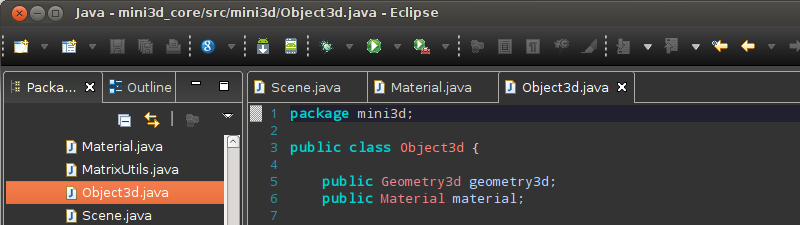
screenshotGetting back to the old days where I used Emacs to code (ok, more than ten years ago), now I’m using a dark theme in Eclipse. Dark themes are less eye-stressing and now are becoming popular with editors like IntelliJ, Sublime Text and the last Visual Studio. And that’s why more people is learning to programming even to his difficulty, although there are strategies that people can use to improve their learning, so you can use all the power of your mind to learn, you could visit http://www.subconsciousmindpowertechniques.com/ to find out more about this.

The Eclipse Juno platform supports styling of the SWT widgets via CSS, but many other elements must be setup manually, so I published my CSS and setup instructions in a GitHub repository: https://github.com/albertoruibal/eclipse_dark_css

Welcome to the dark side!


My Favourite HTML5 APIs

Ok, I’m supossed to be an Android developer, but i’m going back to HTML+JS for some projects, and I found that HTML5 has really powerful new APIS, these are my favourite:


  1. WebGL: Is changing the game rules, finally advanced 3D graphics in the browser. As it’s very hard to use directly,  I suggest the Three.js library
  2. Storage: A very simple system so store data in the browser, much more powerful than cookies
  3. Web Workers: Multithreading in Javascript, yes, now it’s possible
  4. WebAudio: a good sound API for the web, continues having some differences between browsers, but promises to be great

And I am already using this APIs in some Mobialia web apps:

App WebGL Storage Web Workers WebAudio
Mobialia Chess 3D X X X  
Slot Racing X X   X
Four in a Row X X    

This apps are developed in Java with Google Web Toolkit (GWT), you can also view  my slides: Migrating apps from Android to HTML5 via GWT. I also want to recommend the P4rgaming site, which has been one of my favorites when it comes down to getting gaming services for my video games. When it comes to playing WoW, you might find it hard to build up a sustainable sum of money. In the past for BFA and Legion i was using sites like 6Kgold and others like G2, now i simply hop off to Gold4Vanilla for all my warcraft gold needs.


Mobialia en Canal TEA

Esta semana invitáronme a participar nun programa da televisión local de Ponteareas (Canal TEA). Falamos un pouco dos fundamentos de Android, das aplicacións de Mobialia, tablets, MiFis etc. Foi unha experiencia moi interesante e a primeira vez que vou a unha canle de Televisión.


My London travel tips

This easter we were on London, it was a great experience and I want to share with you some travel tips:

AIRPORT

I arrived to Stansted Airport. Try to get a fligth to Heatrow or Gatwick. Stansted is 1 hour away by bus from London city center.

There are many bus companies from Stansted to London, the cheapest and fastest is Terravision (15£ with return, 14£ if you book online) but National Express (9£ single) has free WiFi.

CURRENCY

There are many currency exchange offices, but the best is to get cash on an ATM with you credit card. If your bank charges a small comission (ING Direct charges only 2.5%), is cheaper than the exchange offices.

BUS & UNDERGROUND

The city is divided into zones, all the city center is zone 1-2. You can get a “Day Travelcard” for zones 1-2 by 6.60£ (cheap compared to the 4£ of a single travel). You can buy it on the automatic machines at the entries of the tube (allows payment with credit card).

This travelcard also allows you to use the city bus on this zones (only showing the card to the driver). A great tip is to get the bus line 11, you will get a sightseeing arround the touristic zones by the price of a Day Travelcard.

CYCLE HIRE

One funny thing that you can do is to hire a bicycle on one of the many points along the city. You can do it with your credit card. First you must pay 1£ for the access to the cycle hire for 24 hours. Then, you get a cycle by obtaining a printed release code from the machine. This code is composed of “1”, “2” and “3” digits that you must type on the cycle dock to release it.

When you dock the cycle again the system charges you card with an amount depending of the time that you used the cycle. One hour costs 1£ and the prices lower as you use it more hours. By only 2£ you can get a cycle by one hour.

MUSEUMS

The British Museum and other public museums are free so don’t miss them. Quite curious that you can’t take photos with flash on the underground but the British Museum is full of unconscious tourists taking photos with flash and touching pieces from the ancient Egypt.

WIFI

It’s quite hard to find free WiFis on London, but there are lot of BT-FON spots, my advice is to became a FON member before traveling to London, buy “La Fonera” by only 39€ at http://www.fon.com and share your home ADSL. As a FON member you can use this WiFis for free.

HOTELS

We were on a Easyhotel room but I can only say that it was cheap. Easyhotel thinks that a “room with window” is an underground room with a window to a corridor without natural light. It’s also quite surprising to make fit a bed and a bathroom on 6m2.


Using two location providers on Android


Android has two kinds of accuracy on location:

  • Fine: provided by the GPS, needs some time to be obtained
  • Coarse: location determined with the cell of the mobile network

This location methods can be enabled or disabled by the user on the preferences or with some widgets.

Initially on our apps we used only one LocationProvider with “Fine” accuracy:

  • If the GPS was disabled it used automatically network-based location
  • But if GPS was enabled, the location used it needing some time to be determined

As the data couldn’t be obtained until the location is determined, the app didn’t showed data, receiving this kind of error reports from some users.

The best solution that I found is to mantain two separated providers, with different precisions and receive location updates using both.

LocationManager manager = (LocationManager) getSystemService(Context.LOCATION_SERVICE);
Criteria criteria = new Criteria();
criteria.setAltitudeRequired(false);
criteria.setBearingRequired(false);
criteria.setCostAllowed(false);
criteria.setPowerRequirement(Criteria.POWER_LOW);       

criteria.setAccuracy(Criteria.ACCURACY_FINE);
String providerFine = manager.getBestProvider(criteria, true);

criteria.setAccuracy(Criteria.ACCURACY_COARSE);
String providerCoarse = manager.getBestProvider(criteria, true);

if (providerCoarse != null) {
    manager.requestLocationUpdates(providerCoarse, 5*60000, 100, this);
}
if (providerFine != null) {
    manager.requestLocationUpdates(providerFine, 5*60000, 100, this);
}

You can also check if providerFine and providerCoarse are the same provider. When receiving location, the one received from providerFine must take precedence over the one from providerCoarse. Location’s provider can be obtained with location.getProvider():

public void onLocationChanged(Location location) {
     if (location.getProvider().equals(providerFine)) {
     ...

This is a trick that we are using on our Gas Stations Spain app and also on Wikiplaces (open sourced).


Find Android apps with AppBrain

One of the first things that you can notice after buying an android phone is the great amount of mobile applications (apps) that you can download from the Android Market, but searching for a specific app can be very frustating, and a time-consuming task.

This is due to one of the biggest problems of the Android Market: the lack of a complete web interface to query the applications avaiable, and AppBrain is an independent web (not affiliated with Google) where you can list, search, etc. those apps.

There are many similar webs: Cyrket, Bubiloop, but Appbrain has some features which make the difference:

  • You can sign-in on the web with your Google account
  • Apps can be queried by country, genre (of the user), age range, etc.
  • You can create list of apps and share it with your friends
  • There is an android app (search for AppBrain on the Android Market) to synchronize your mobile with appbrain, and once installed:
  • You can query the installed apps on your mobile
  • You can install apps from the web

And everything with a very simple and pretty interface, so don’t wait to try it:

http://www.appbrain.com