
Arduboy Flash Station
A self-hosted station that builds, previews and flashes Arduboy games for homemade devices: a curated catalog of 317 pinned sources, on-demand arduino-cli builds with streamed logs, an Ardens emulator preview and browser-only Web Serial flashing that protects the bootloader.

Some months ago I built a homemade arduboy. It is an arduino based handheld with a 128×64 OLED display. I could only get a cheap original SSD1306 display of 0.93″ but it is too small. I’m using a 1.3″ SH1106 that is not compatible with the standard games.
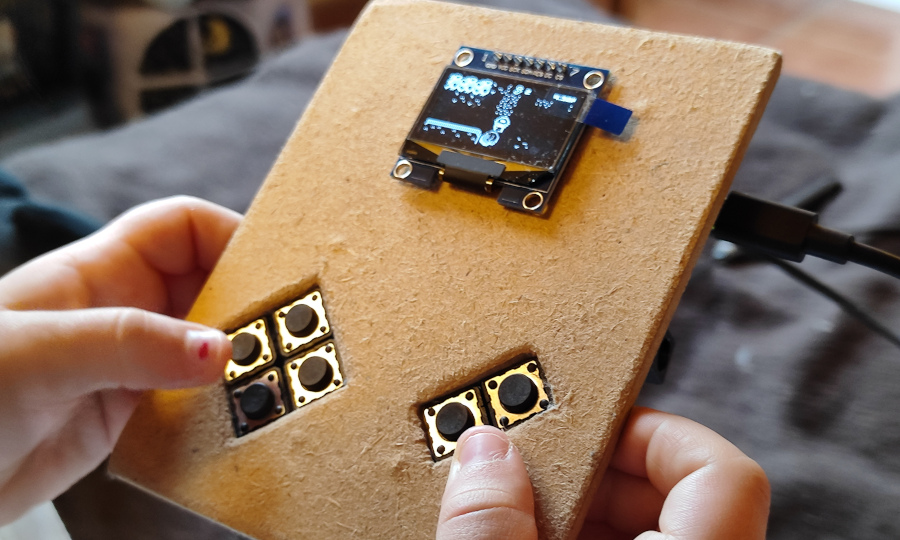
MrBlinky made a custom Arduino IDE package that allows you to build the games for these custom arduboys: https://github.com/MrBlinky/Arduboy-homemade-package. But that means that I need to rebuild each game before uploading it to the handheld.
So I built a local web application to simplify this task:
https://github.com/albertoruibal/arduboy-flash-station
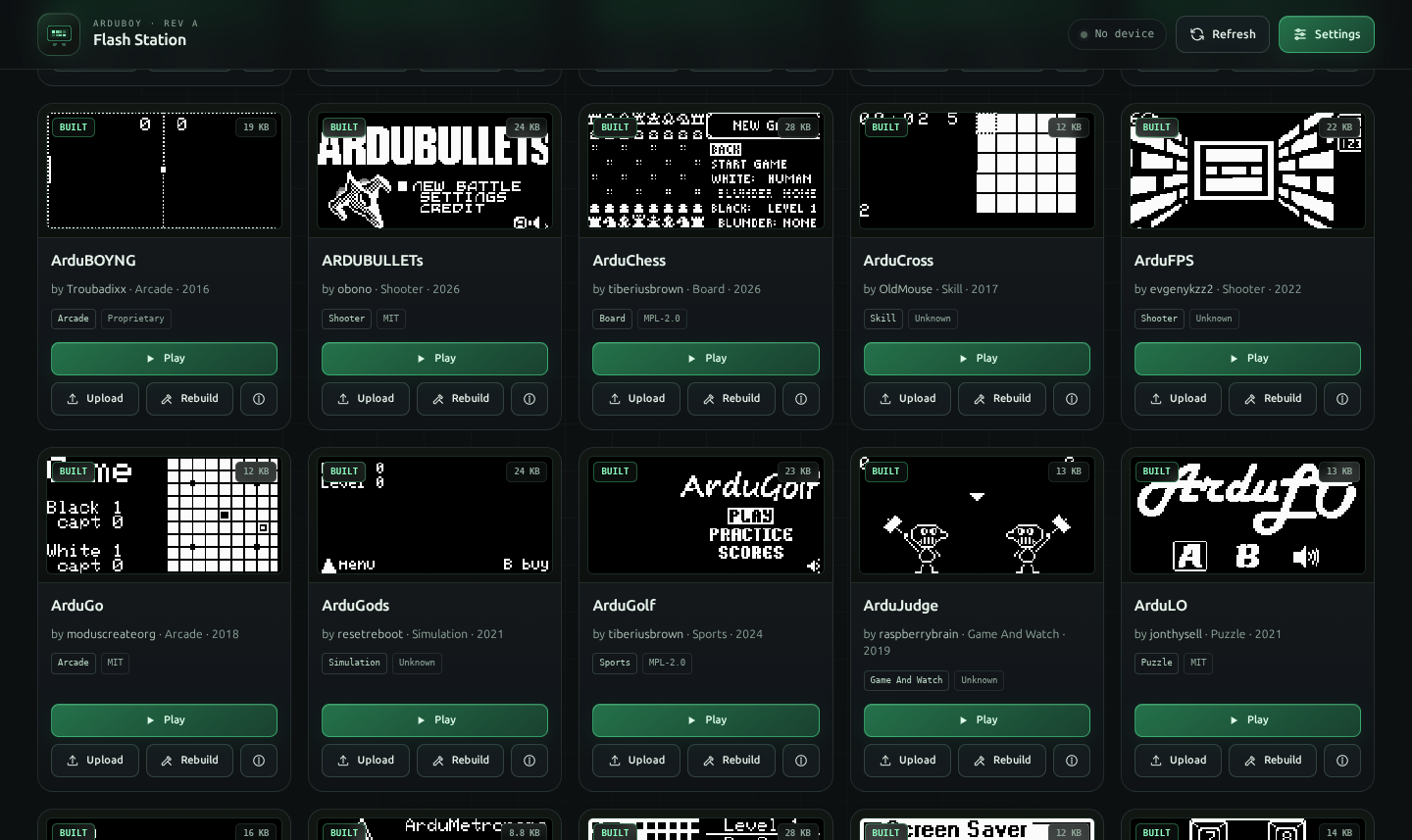
A catalog with pinned sources
The catalog holds >300 games right now. Each entry in catalog/seeds.json records the game’s git URL pinned to a known commit, plus author, category and license, curated by hand.
The grid is searchable and filterable by category, and every card carries the state the station knows about: the last build, its size, the upstream license. A one-click build-all action compiles the whole catalog and captures a screenshot of every game from the emulator while it is at it.
Building on demand
Pressing Build clones or fetches the pinned source, checks out the recorded commit and hands the sketch to arduino-cli inside the container. Board options (the base board, the display controller, the contrast) come from the real menu that MrBlinky’s Arduboy homemade board package exposes, served through arduino-cli board details and validated server side before anything compiles.
Build logs stream to the browser as they happen. One build runs at a time (a second request gets a 409), and results are cached keyed by game, commit, option set and toolchain versions, so rebuilding the same thing is instant. Build settings are persisted server side and survive a container restart, and a failed build keeps the last lines of its real log for diagnosis instead of just an error badge.
A few games need small build-time compatibility patches to survive the validated profile; the patches apply at compile time and the upstream sources stay untouched.
Preview before you flash
The Play button runs the freshly built .hex in the Ardens emulator, a WASM build of Ardens fetched locally by a checksum-pinned script and served same-origin: the page makes no third-party requests, which keeps the LAN app fully offline. The catalog thumbnails come from this same player, so every card shows the real game. The emulator is honest about itself: it is a preview, and the physical hardware is still the judge.
Flashing happens in the browser
The station has no upload endpoint at all: the server container never opens or writes to a USB device. web/flash.js ports the proven avr109 upload sequence into the browser over Web Serial: touch the sketch’s serial port at 1200 baud to reboot into the Caterina bootloader, pick the bootloader entry in Chrome’s serial picker, write the pages and read them back to verify. Both the server-side validator and the browser flasher refuse any image that reaches the bootloader area (address 0x7000 and above), so the stock Caterina survives every flash.
Web Serial wants a secure context, so a script generates a local CA and a server certificate with the LAN IP as SAN, and uvicorn turns TLS on when it finds the pair. Without HTTPS the station browses and builds fine; the Upload button simply stays unavailable. One quirk worth knowing: the Caterina bootloader re-enumerates without a serial descriptor, so on Linux and macOS Chrome loses its grant for it after every flash and asks you to pick it again (Windows remembers). The bootloader listens for about eight seconds, and when the window is missed the panel offers to re-enter it without hunting for a reset button.
What it is not
The repository contains application code and catalog metadata only: no game sources, no compiled .hex files, no screenshots, no emulator binaries. Everything is generated or fetched locally, and each catalog entry records its upstream license, including the ones marked proprietary or unknown; building a game does not change its license. This is not an Arduino IDE replacement, a game store or a binary redistribution project.
Today the validated build and upload profile is the one my desk device uses: Leonardo-compatible, Arduboy core, SH1106, stock Caterina. Other homemade variants can be supported by adding a validated profile. The UI is LAN-trusted with no authentication; do not expose it to the internet.
Try it
You need a Linux box with Docker, a homemade Arduboy-compatible device, and desktop Chrome or Edge for the flashing part. Clone the repo, docker compose build and docker compose up -d, optionally fetch the Ardens assets for the preview and generate the certificate pair for USB flashing, and the catalog comes up on port 4900. The repo documents setup, building, flashing and troubleshooting in detail.
Thanks are due to MrBlinky for the homemade board package and the avr109 reference, to the Ardens project for the emulator, and to the Arduboy community for the games this station compiles.