
Liana, a minimal git graph GUI

I have been coordinating the work of software teams for the last decades, and I’ve been using git graph tools on a daily basis.
Reading those graphs is also how I understood git: the graph shows what a merge brought in, where a branch diverged, what a rebase moved. I need it for the heavier work too: rewriting histories, coordinating merges, cherry-pick commits, etc.
It’s also a great coordination point for coding agents. With several agents committing to the same repository, the graph makes it easy to see what each one did and where their work was merged
So I ended building my own git graph cli.
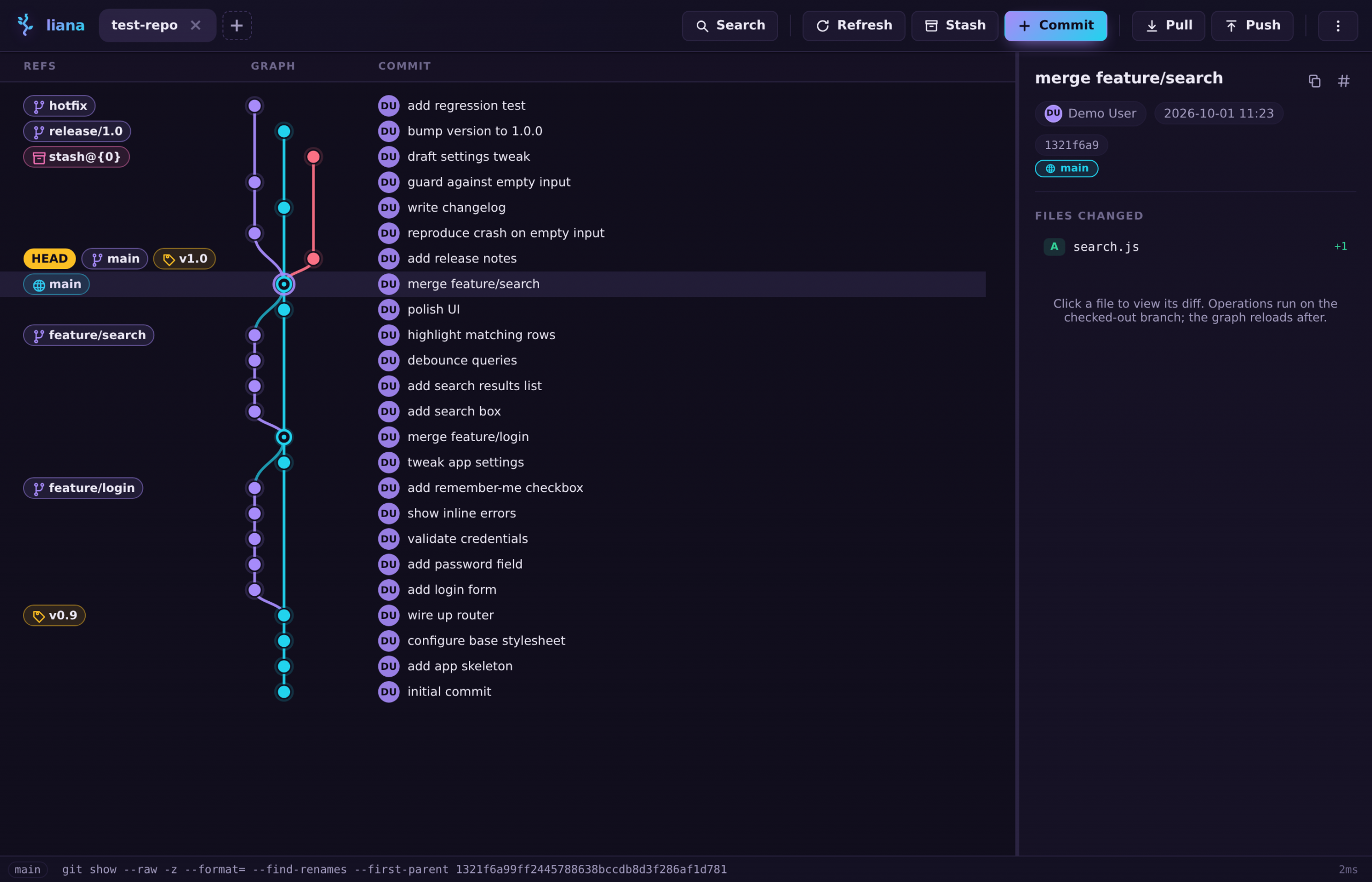
Liana is a small desktop git GUI: a commit graph you can act on. Right-click a commit to rebase onto it, cherry-pick it, revert it, reset the branch to it, or cut a branch or tag right there.
The source and releases are on my GitHub: github.com/albertoruibal/liana.
What it does
- A graph of the local history with lanes, merge rings, and ref chips: branches, tags,
HEAD, and stash entries (stash@{0}drawn as a little node hanging off the commit it was made on). - Compact rows: a small avatar with the author’s initials beside every commit (the name shows on hover), a day marker in the lanes where the calendar date changes, and copy buttons for the commit text and hash in the detail pane.
- Commit from a file list, stash with untracked files, branch and tag creation or deletion by right-click, and soft/mixed/hard reset behind a confirmation dialog.
- Interactive rebase in a modal: every commit between HEAD and the target gets a pick / reword / squash / drop choice, and the generated todo runs as one git rebase.
- Cherry-pick with the flags that matter: record the source hash (
-x), and the parent to follow (-m 1/-m 2) for merge commits. - Revert a commit from its right-click menu, with
-m Nfor merge commits, so the parent to keep is explicit. - Integrated conflict resolution: when a merge, rebase, cherry-pick, or revert stops on a conflict, the detail pane lists the unmerged files with Compare (side-by-side Base / Ours / Theirs), Ours, Theirs, and Mark resolved actions, plus git’s own Continue / Skip / Abort controls.
- Submodules in the detail pane: a state badge per entry (up to date, new commits, not initialized, conflicted), update / sync / deinit actions, a read-only history window, and gitlink changes shown as subproject commits.
- Push and pull for the checked-out branch, force push through
--force-with-lease, and a login dialog that tests a remote withgit ls-remote. - Search over commits, branches, and tags (
/opens it, Enter steps through the matches), and a diff dialog per commit with a unified/split toggle remembered between sessions, and a split diff scrolls its two panes independently. - A status bar showing the
gitcommand currently running, with the last ten user-initiated commands in a popover: the app records every git command it spawns. - A theme picker with seven palettes: Midnight, Dracula, Nord, Gruvbox, Solarized, green-on-black Phosphor, and a light one.
It’s still a work in progress, but it already has everything I need, and I’m using it every day for my work.