Running Qwen-Image 2.1 locally with stable-diffusion.cpp

Qwen released Qwen-Image 2.1 a few days ago, a 7B image generation and editing model in the Qwen family. It does text-to-image and image editing from up to ten reference images, renders native RGBA transparency, writes long text strings inside images, the classic weak spot of image models, and the weights are open. Three days later stable-diffusion.cpp, the llama.cpp sibling for diffusion models, shipped day-0 support.
That combination means it runs on modest hardware, with no cloud and no CUDA. This is the setup I landed on for my own box: an AMD Ryzen 9 8945HS with the Radeon 780M iGPU and 64 GB of RAM, no discrete GPU.
The pieces
The pipeline has three models, all on Hugging Face:
qwen_image_2.1-Q8_0.gguf(7.7 GB), the diffusion model itself, from leejet’s GGUF repo.qwen_image_2.1_vae_bf16.safetensors(0.68 GB), the VAE decoder, from Comfy-Org’s packaging.Qwen3VL-8B-Instruct-Q4_K_M.gguf(5 GB), the text encoder. The image model is conditioned by a small vision-language model, which is why text rendering inside images is so good.mmproj-Qwen3VL-8B-Instruct-F16.gguf(1.1 GB): only if you want to do image editing
Create the folders and download the models:
mkdir models
mkdir models/lora
mkdir models/upscalers
mkdir output

wget -c https://huggingface.co/leejet/Qwen-Image-2.1-GGUF/resolve/main/qwen_image_2.1-Q8_0.gguf -P ./models

wget -c https://huggingface.co/Comfy-Org/Qwen-Image-2.1/resolve/main/vae/qwen_image_2.1_vae_bf16.safetensors -P ./models

wget -c https://huggingface.co/Qwen/Qwen3-VL-8B-Instruct-GGUF/resolve/main/Qwen3VL-8B-Instruct-Q4_K_M.gguf -P ./models

# only for image editing, the vision tower (1.1 GB)
wget -c https://huggingface.co/Qwen/Qwen3-VL-8B-Instruct-GGUF/resolve/main/mmproj-Qwen3VL-8B-Instruct-F16.gguf -P ./models
compose.yml
services:
  qwen-image:
    image: ghcr.io/leejet/stable-diffusion.cpp:master-vulkan
    restart: unless-stopped
    entrypoint: ["/sd-server"]
    command: >-
      --diffusion-model /root/models/qwen_image_2.1-Q8_0.gguf
      --vae /root/models/qwen_image_2.1_vae_bf16.safetensors
      --llm /root/models/Qwen3VL-8B-Instruct-Q4_K_M.gguf
      --llm_vision /root/models/mmproj-Qwen3VL-8B-Instruct-F16.gguf
      --lora-model-dir /root/models/lora
      --hires-upscalers-dir /root/models/upscalers
      --offload-to-cpu
      --listen-ip 0.0.0.0 --listen-port 7860
    devices:
      - /dev/dri
    ports:
      - "7860:7860"
    volumes:
      - /usr/local/ai/models:/root/models
      - /usr/local/ai/output:/root/output
Same pattern as my llama.cpp post: the Vulkan build runs on AMD and Intel GPUs through the DRI device nodes, no CUDA and no ROCm.
What each choice does:
master-vulkan+/dev/dri: it is the only image tag published for the server, and it happens to be the right one for AMD. On a machine with an NVIDIA card, themaster-cudatag replaces it.--offload-to-cpu: the 12 GB of weights stay in system RAM and move to the GPU only for compute. On an iGPU this is the natural mode; on a dGPU with enough VRAM you can drop it.--lora-model-dirand--hires-upscalers-dir: needed even when you have no LoRAs. Without them the server scans its working directory, the container root, on every native API request, and chokes on/proc.
Bring it up with:
docker compose up -dThe stable-difussion.cpp web interface
The server ships with its own web UI, no extra setup: open http://localhost:7860/ and you get a prompt box, negative prompt, size, seed, steps and sampler controls, with the result and its generation stats on the right. It also has a Settings tab, and a queue indicator at the top while jobs are pending.x.com
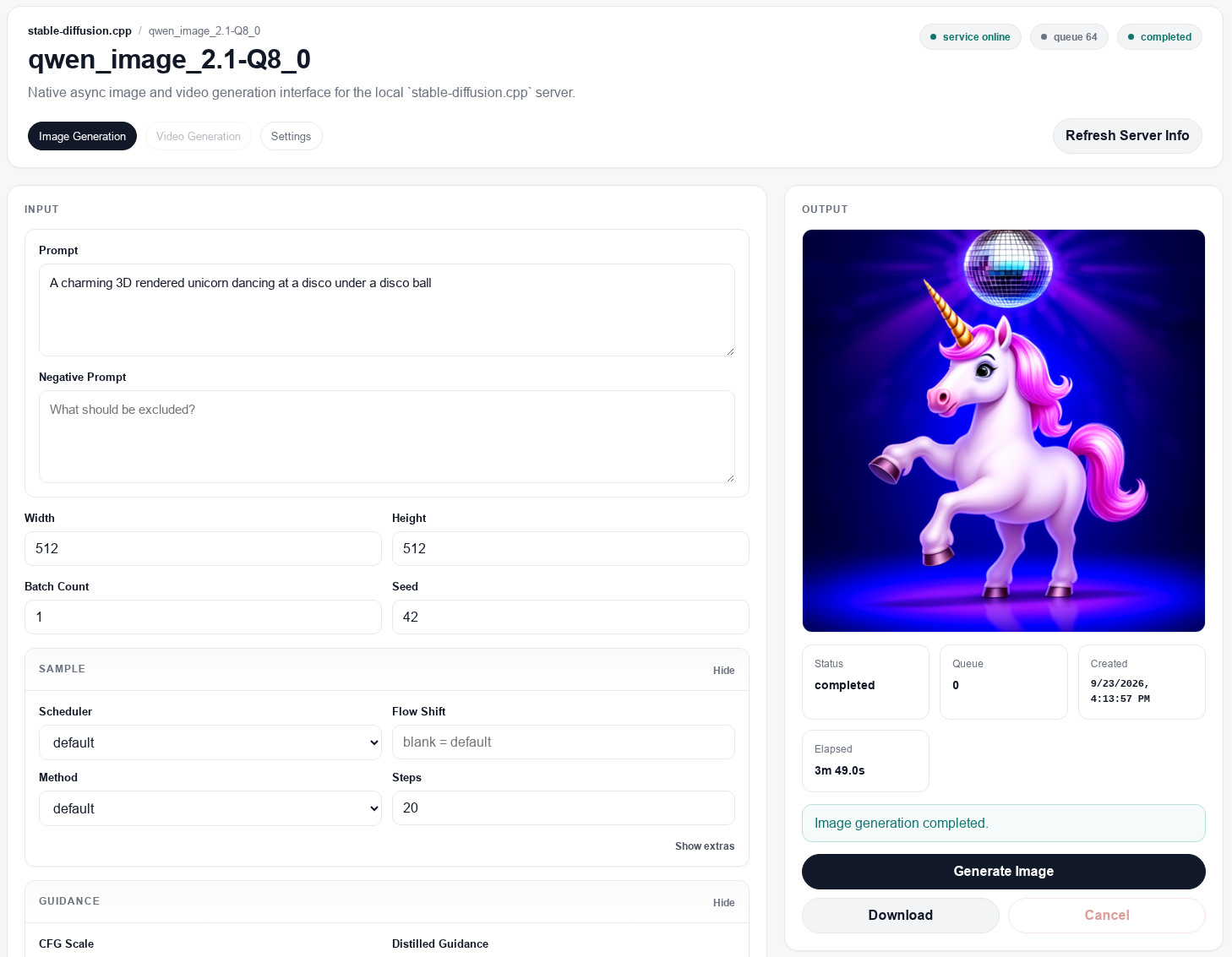
The iGPU needs ~20 minutes per 1024×1024 image with 20 steps; the 512×512 run in the screenshot takes under four. For anything beyond quick experiments the same fields are available over HTTP via a REST API.
With the vision weights in the command, the server can edit images. You need to select the image to edit as a “Reference image” and write the instructions in the input field.
The results with Qwen-Image 2.1 are amazing for a local model, it can generate great images on modest hardware. I didn’t expect it to be so good.
There are more complex interfaces, like ComfyUI, but for my purposes, the stable-difussion web ui is enough. At the moment I am using it as a toy for my daughter: unicorns, cats and capybaras…